
The Ultimate Website Redesign SEO Checklist: Protect Traffic & Authority
Redesigning your website without an SEO strategy can wipe out years of organic search rankings overnight. Follow our battle-tested, step-by-step checklist to migrate URLs, protect domain authority, and boost Core Web Vitals.

Why SEO Must Lead Your Website Redesign Project
A visual makeover can dramatically improve user conversion rates, but if organic search traffic drops by 50% post-launch, your overall revenue will suffer. Many businesses treat SEO as an afterthought during a redesign—asking designers and developers to "SEO check" the site hours before DNS launch.
Plan technical SEO alongside the design so you can preserve useful content, map changed URLs, and check indexing before launch. These checks reduce migration risk; they do not guarantee unchanged rankings.
Step-by-Step SEO Migration Checklist
Phase 1: Pre-Migration Discovery & Crawl Baseline
Complete Site Audit & URL Export
Crawl your site to record URLs, status codes, canonical tags, titles, and descriptions. Export Search Console performance and links separately; these reports are not a complete crawl inventory.
Identify Top Traffic-Generating Pages
Flag top 20% high-value landing pages driving organic traffic and revenue. Prioritize these pages for strict URL slug preservation.
Benchmark Core Web Vitals Metrics
Record baseline LCP (Largest Contentful Paint), INP (Interaction to Next Paint), and CLS (Cumulative Layout Shift) scores.
Phase 2: URL Mapping & 301 Redirect Architecture
1:1 URL Structure Mapping
Whenever possible, maintain identical URL paths on the new website to preserve existing domain authority and index signals.
Implement 301 Permanent Redirect Maps
If URL structures must change, map every old URL to its exact relevant replacement page. Never redirect all old pages to the homepage.
Audit Internal Linking & Anchor Text
Update internal links within blog posts and navigation bars to point directly to new canonical URLs, eliminating 301 redirect chains.
Phase 3: Technical & On-Page SEO Implementation
Semantic HTML & Heading Hierarchy
Ensure pages feature a single unique <h1> tag, structured <h2> and <h3> tags, and semantic HTML5 section wrappers.
Canonical Tag Verification
Set self-referencing <link rel='canonical'> tags on all new pages to prevent duplicate content indexing.
XML Sitemap & Robots.txt Rebuilding
Generate a clean, structured XML sitemap and verify robots.txt doesn't accidentally block Googlebot from crawling CSS or JS assets.
Phase 4: Post-Launch Verification & Index Monitoring
Resubmit XML Sitemap in Search Console
Immediately after DNS point, submit your updated XML sitemap to Google Search Console and Bing Webmaster Tools.
Perform Live 404 & Redirect Audit
Crawl the live production site to detect broken links, missing image ALT text, or unhandled 404 errors.
Track Keyword Positions Daily for 30 Days
Monitor ranking positions and organic impression metrics to identify and fix any transient keyword fluctuations.
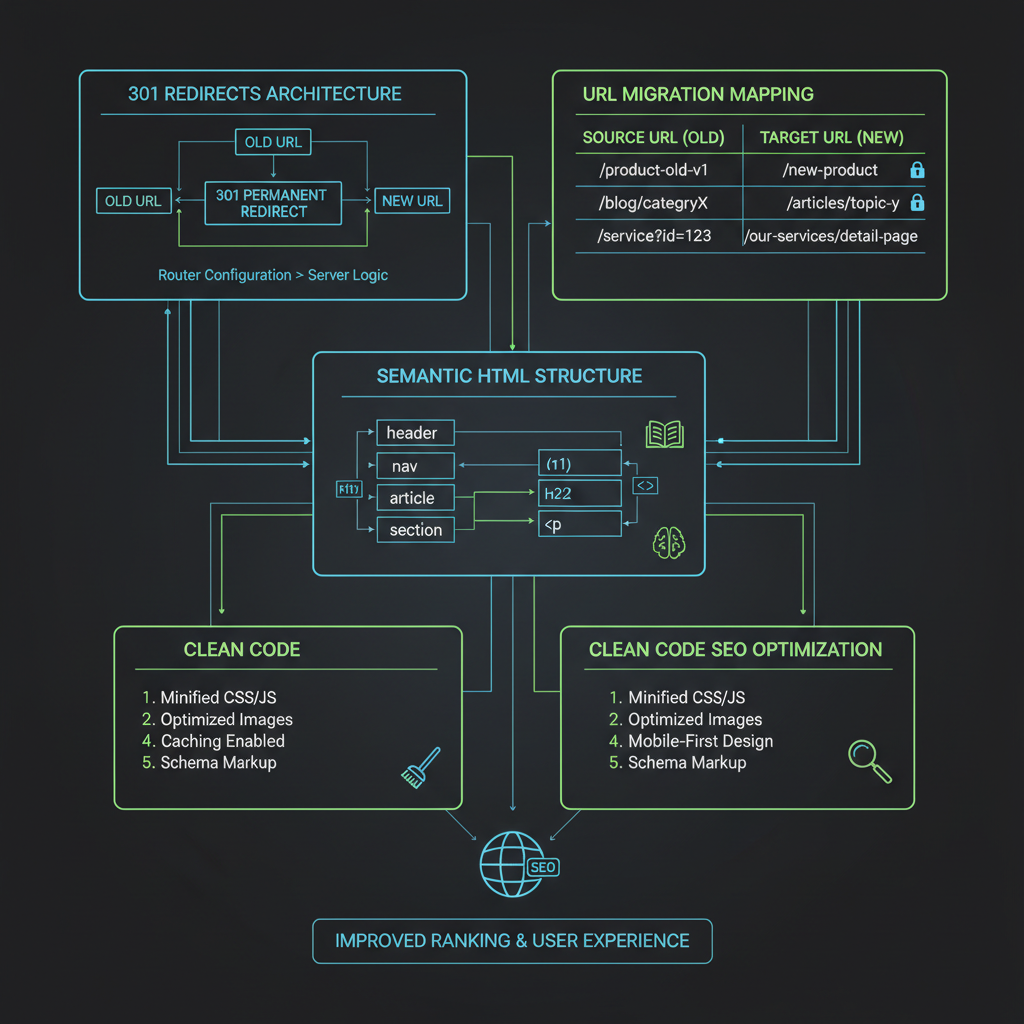
Sample Permanent Redirect Configuration (Next.js)
When migrating legacy URL slugs to your new React / Next.js architecture, configure permanent redirects in your `next.config.js` file:
// next.config.js: permanent redirects (HTTP 308)
module.exports = {
  async redirects() {
    return [
      {
        source: '/services/old-web-design',
        destination: '/website-redesign-services',
        permanent: true, // Next.js returns HTTP 308
      },
      {
        source: '/blog/outdated-article-slug',
        destination: '/blog/modern-web-design-trends-2025',
        permanent: true,
      },
    ];
  },
};
4 Critical SEO Pitfalls During a Redesign
- 1.Launching with Staging Noindex Tags: Forgetting to remove
<meta name="robots" content="noindex">from staging code when moving to production. - 2.Wildcard Homepage Redirects: Pointing all legacy 404 URLs to the homepage instead of matching specific topic destinations.
- 3.Orphaned Canonical Headers: Forgetting to update canonical URL meta tags to HTTPS domain addresses.
- 4.Ignoring Image ALT Attributes: Dropping image alternative text descriptions during asset migration.
Almost every story about a redesign that destroyed a site's traffic comes down to the same handful of causes, and all of them are preventable. What follows is what actually breaks during a redesign, why it breaks, how to catch it before launch, and what to do in the weeks afterwards when the numbers move and you need to know whether to worry.
What a redesign actually risks
A search engine's understanding of your site is built from things that mostly live outside the visual design: the URLs, the content on each one, the internal links between them, and the external links pointing in. A redesign that leaves those four alone is close to risk-free no matter how different the site looks.
The danger comes from redesigns that quietly change them. A new CMS invents a new URL pattern. A new template drops the copy that was carrying the page. A tidier navigation removes the internal links that were distributing authority. None of these are design decisions — they are side effects of design decisions, which is exactly why they get missed.
So the useful framing is not "how do I protect SEO during a redesign" but "which of these four things is my redesign about to change, and have I planned for it".
Before you start: get a baseline you can compare against
You cannot tell whether a redesign hurt you if you did not record what you had. Do this while the old site is still live, because several of these become impossible to reconstruct afterwards.
The crawl matters most. Export every indexable URL along with its title, meta description, canonical target and status code. If you skip this and later discover a page is missing, you will have no way of knowing what its URL was.
- A full crawl of the current site — every URL, its status code, title, meta description, canonical and word count. Screaming Frog, Sitebulb or Ahrefs will do it; so will a free crawler for a small site.
- Your top pages by organic traffic — from Search Console, last 12 months. These are the URLs that must not change. Everything else is negotiable.
- Your top pages by referring domains — from any backlink tool. A page with external links is carrying authority that dies with its URL.
- Current Core Web Vitals — so you can tell whether the new build is genuinely faster or just feels faster on your own machine.
- A copy of the current XML sitemap — it is the cheapest complete record of what you intended to have indexed.
URLs: keep them, or map every single one
This is the decision that determines how risky the whole project is. If your URLs do not change, most of the rest of this checklist becomes optional. If they do change, every old URL needs a 301 redirect to its closest equivalent on the new site.
The word "closest" is doing real work there. Redirecting a deep page to the homepage is treated as a soft 404 by Google — it recognises that the destination does not answer what the original page answered, and the redirect passes nothing. A redirect is only useful when the destination genuinely replaces the source.
Watch for chains as well. If /old-page redirects to /interim-page which redirects to /new-page, update the first redirect to point straight at the final destination. Chains work, but they waste crawl budget and lose a little at each hop.
And update your internal links to point at the new URLs directly rather than relying on the redirects. Redirects are a safety net for external links and old bookmarks; your own navigation should not need one.
- 301, not 302 — 302 signals a temporary move and Google may keep the old URL indexed. Use 301 (or 308) for anything permanent.
- One-to-one, not many-to-one — map each old URL to its actual replacement. Bulk-redirecting a section to its category page loses the specificity that made those pages rank.
- Test before launch — run your old URL list through the redirect map on staging and check every one resolves with a single 301 to a 200.
The staging-site mistakes that cause the worst outcomes
Two failures account for a disproportionate share of catastrophic redesign outcomes, and both happen at the moment of launch rather than during the build.
The first is shipping the staging site's robots directives to production. A staging environment is usually blocked with a site-wide noindex or a Disallow: / in robots.txt, and if that survives the deployment your entire site tells Google to remove it. This can drop a site out of search within days and it is completely silent — nothing looks wrong on the page.
The second is the reverse: leaving the staging site itself crawlable and indexable, so it competes with production as duplicate content. Protect staging with HTTP authentication rather than robots.txt, because authentication cannot be accidentally deployed and cannot be ignored.
Check the live production site's robots.txt and the robots meta tag on several page types immediately after launch. Not the staging site. The live one.
Content and markup: what carries the ranking
A page ranks largely on what it says. Redesigns lose rankings when the new template holds less text than the old one — usually because a designer, quite reasonably, thought the page looked cluttered.
The risky pattern is moving substantive copy into tabs, accordions or modals that load content only after an interaction. Content hidden behind a click is generally indexed, but content that is not in the HTML at all until a user acts may not be. If the copy is worth ranking for, it should be in the initial response.
Heading structure matters for the same reason: one H1 per page, descriptive rather than decorative, with H2s that reflect the actual sections. Redesigns often replace a text H1 with a background image containing the words, which removes the heading entirely.
Also carry across your title tags and meta descriptions rather than regenerating them. A templated title formula applied site-wide will overwrite pages whose titles were tuned over years.
Launch day, in order
Work through this the moment the new site is live, not the next morning. Most of these take minutes and the cost of finding them late is measured in weeks of lost crawling.
Start with the things that can take a site out of the index entirely, then move to the things that merely degrade it.
- robots.txt on production — confirm it does not disallow the site and does not block CSS or JS, which Google needs to render pages.
- Robots meta on real pages — check a homepage, a category page and a deep page for a stray noindex.
- Canonical tags — each page should self-canonicalise unless you deliberately intend otherwise. A template-wide canonical pointing at the homepage is a classic launch bug.
- Redirects live — spot-check your highest-traffic old URLs by hand, then crawl the full list.
- Sitemap regenerated and submitted — it should contain the new URLs and none of the old ones.
- Analytics and Search Console — confirm tracking fires on the new templates; redesigns routinely drop the tag from one page type.
The first month afterwards, and when to actually worry
Expect movement. Google has to recrawl the site, follow the redirects and reassess the new pages, and rankings commonly wobble for a few weeks even when everything was done correctly. Reacting to week-one noise by reverting changes is how a recoverable dip becomes a prolonged one.
What to watch, in order of seriousness: a sharp fall in indexed pages in Search Console's Page indexing report, a spike in 404s, and crawl errors on URLs you redirected. Those indicate a mechanical problem you can fix. A gradual drift in average position without any of those is more likely to be a content or competitive issue than a migration one.
Use the URL Inspection tool on a handful of important pages to see exactly what Google fetched and rendered — it will tell you whether your content is visible to it, which is usually the question you actually have.
If traffic has not recovered after about four to six weeks and the indexing report is clean, the problem is probably not the migration. At that point look at whether the new pages genuinely say as much as the old ones did.
Nearly every redesign that loses traffic loses it to one of four things: changed URLs without redirects, a staging noindex shipped to production, content dropped from the new template, or a template-wide canonical pointing somewhere wrong. Check those four and you have covered most of the real risk.
Frequently Asked Questions
Will a website redesign harm my current search engine rankings?
A redesign can affect rankings when URLs, content, internal links, or indexing settings change. Relevant permanent redirects and careful launch checks reduce risk, but do not guarantee that rankings stay the same or improve.
What is the biggest SEO mistake during a site redesign?
The most costly mistake is launching a new site with modified URL paths without setting up 1-to-1 301 redirects from old URLs, or leaving staging 'noindex' tags active on the live production server.
How long does it take for Google to process a site redesign?
Timing varies by site and URL. A sitemap helps Google discover your pages but does not guarantee when they will be crawled or indexed. Monitor URL Inspection and Search Console after launch.
What SEO checks are needed after using Redesignr.ai?
Review the generated HTML against your original site. Check titles, descriptions, canonical tags, headings, content, links, and image alternatives. Set up any required redirects and measure the deployed site; generated code does not guarantee rankings or performance scores.
Redesign Your Site Without Losing SEO Authority
Redesignr.ai automatically generates clean, semantic, SEO-friendly HTML/CSS code that preserves your visual hierarchy and optimizes Core Web Vitals out of the box.
Start SEO-Safe Redesign Now