
Website Redesign vs. Full Rebuild: Complete Framework
Should you modernize your web page visuals or rebuild your entire technical stack from scratch? Evaluate cost, timelines, SEO risks, and conversion impact.
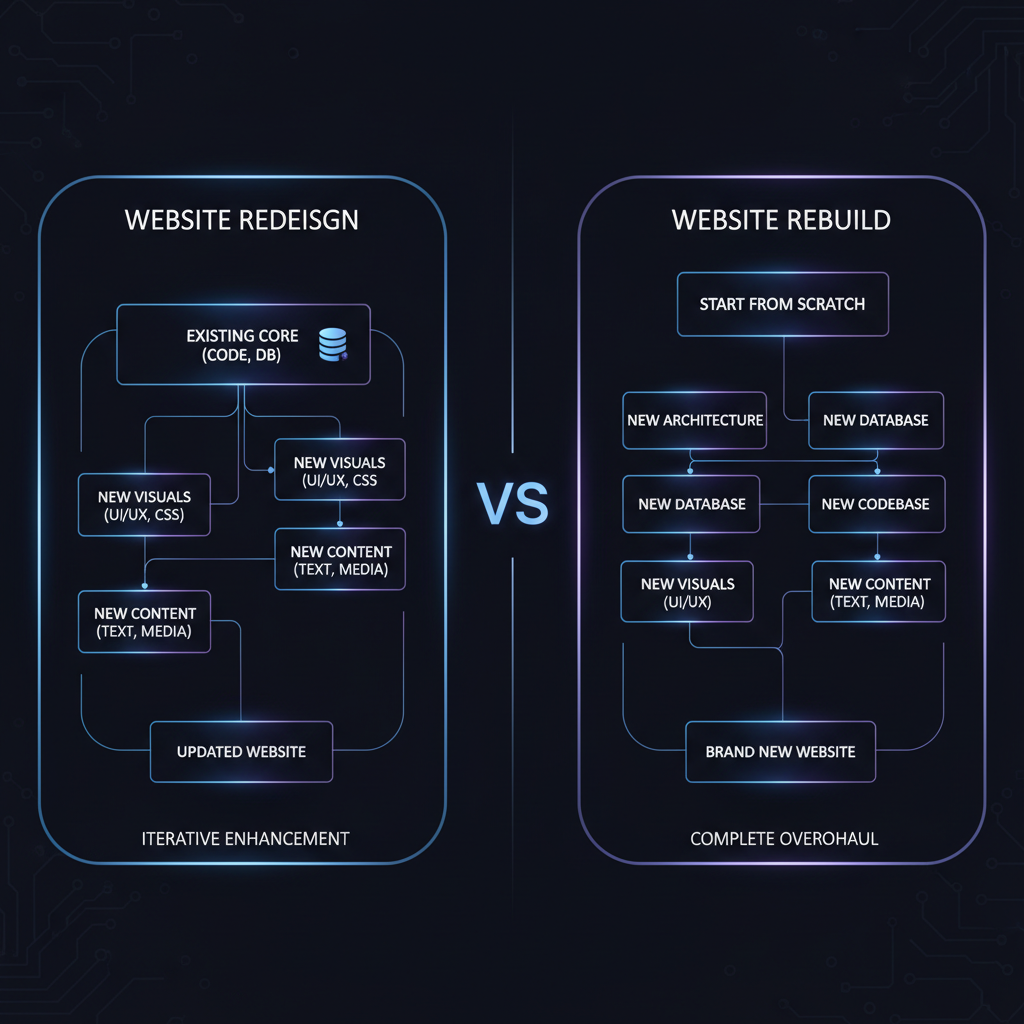
The Strategic Dilemma: Facelift vs. Ground-Up Rebuild
When a company's website underperforms in conversion rates or visual aesthetics, leadership is faced with a critical strategic choice: should you perform a targeted visual redesign or tear down the existing code structure for a full technical rebuild?
Rebuilding a website from scratch carries enormous operational overhead: multi-month agency sprint cycles, risk of lost SEO backlink authority, broken internal links, and potential downtime during database migrations.
By leveraging AI website redesign tools like Redesignr.ai, companies can modernize their front-end presentation layer, optimize mobile responsiveness, and update visual branding while retaining existing URL paths and SEO rank authority.
Modernizing web interfaces using automated AI DOM parsing gives growth teams the agility to launch fresh conversion-focused designs without interrupting existing customer operations or risking search engine indexing penalties.
Head-to-Head Architectural Comparison
Website Visual Redesign (AI-Powered)
Modernizing layout aesthetic, improving mobile responsiveness & CRO without touching backend databases.
Full Technical Rebuild
Migrating legacy CMS platforms, replacing backend database architecture, or fixing broken server code.
How to Make the Right Strategic Choice
1. Choose Visual AI Redesign If...
Your existing website has strong search engine keyword rankings, clear customer copy, and working backend forms, but suffers from an outdated 2010s visual aesthetic or non-responsive mobile layout. Redesignr.ai ingests your live URL to update CSS grid presentation in seconds without touching database routes.
2. Choose Full Rebuild If...
Your underlying CMS platform is end-of-life, your backend database architecture has severe security vulnerabilities, or your company is undergoing a complete business pivot that invalidates all existing product pages.
These two words get used interchangeably and they describe projects an order of magnitude apart in cost and risk. Choosing the larger one when you needed the smaller is the most common way a website project overruns; choosing the smaller when you needed the larger is how you end up doing it twice.
The actual difference
A redesign changes how the site looks and how content is presented. The platform stays, the content stays, the URLs generally stay.
A rebuild replaces the underlying implementation — the CMS, the codebase, the hosting, or all three. The design usually changes too, but that is a consequence rather than the point.
The distinction matters because the risk profiles are completely different. A redesign risks looking worse. A rebuild risks losing content, breaking integrations, changing every URL, and taking three times as long as estimated.
The test: what is actually failing?
Ask what specifically is wrong, and be concrete. The answer usually places you clearly on one side.
If the complaint is about appearance, hierarchy, mobile behaviour or the site looking older than the business — that is presentation, and a redesign covers it.
If the complaint is that every change breaks something, that nobody will touch the codebase, that you cannot add a page without a developer, that the site is slow in ways no amount of image optimisation fixes, or that the platform no longer receives security updates — that is implementation, and a redesign painted over it will not last.
Signals that you are past redesigning
Some conditions genuinely mean the implementation has to go, and recognising them early saves a lot of wasted effort.
The clearest is unpredictable change cost. When nobody can estimate a small modification because it might touch anything, the site is no longer a system you maintain — it is a set of exceptions you negotiate with.
Others: a platform that is end-of-life or unpatched, a stylesheet where new rules only work with escalating specificity, a mobile layout maintained separately from the desktop one, and a build process only one departed contractor understood.
- Unpredictable change cost — small edits cannot be estimated because they might break anything.
- Unsupported platform — no security updates, or a version you cannot upgrade past.
- Specificity spiral — new CSS only applies with escalating overrides and !important.
- Parallel mobile site — two designs maintained separately, drifting apart with every change.
- Key-person dependency — the deployment process lives in one person's head, and they left.
What survives either way
Your content. This is the point people miss when they treat a rebuild as starting over.
Copy, images, structure and the URLs themselves are the accumulated asset, and they are independent of the implementation. A rebuild replaces how the site is made, not what it says. Keeping that distinction clear is what stops a rebuild from becoming a content project as well, which is how twelve-week estimates become nine-month ones.
If your content genuinely also needs replacing, that is a third project. Run it separately, and probably first — rebuilding a site around content you are about to change is doing the work twice.
The hybrid that usually wins
The most practical answer for most sites is neither pure option: rebuild the templates, keep the content and the URLs.
That gives you a maintainable implementation and a modern design while preserving everything that carries ranking and meaning. It also lets you deploy incrementally, template by template, rather than switching the whole site in one night.
Incremental is significantly safer. Replace one template, watch it for a week, then continue. A staged rollout gives you evidence at each step, and a rollback that only affects one page type.
How the arithmetic has changed
Rebuilds were historically avoided because rebuilding was the most expensive thing available, so sites limped along for years past the point where patching made sense.
When producing a page's markup can be generated from the existing page, the production half of a rebuild costs a fraction of what it did. That does not make rebuilds free — content migration, integrations and redirects are unchanged — but it moves the break-even point.
Projects that would previously have been another two years of patching are now reasonable to rebuild, which is worth reconsidering if you priced one a few years ago and decided against it.
If the complaint is about appearance, redesign. If small changes have become unpredictable or the platform is unsupported, rebuild. For most sites the right answer is rebuilding the templates while keeping the content and the URLs.
Frequently Asked Questions
Should I redesign or fully rebuild my business website?
If your underlying content, products, and backend logic work well but your visual presentation looks dated or fails mobile responsive tests, an AI visual redesign is the best choice. If your CMS is obsolete or security-compromised, a full rebuild is necessary.
Will a website redesign harm my existing Google SEO rankings?
No. A visual redesign preserves your existing URL paths, canonical metadata tags, and content structure while modernizing CSS layout rules, which actually boosts Google rankings by improving mobile page speed.
How much money does an AI visual redesign save compared to a full rebuild?
An AI visual redesign with Redesignr.ai saves 90% or more compared to a full agency rebuild, replacing $15,000 agency quotes with credit-based automated code generation.
Redesign Your Site Without SEO Risks
Ingest your live URL into Redesignr.ai to modernize visual styling while preserving your search engine backlink authority.
Start AI Website Redesign